Collect and compare your spot freight quotes, decide in one place, track your cargo on a map and keep your consignee updated.
Request quotes from carriers with a single link for your sea, road and air shipments. Prices arrive side by side in one table; the email and spreadsheet back-and-forth disappears, and every decision stays on record. After loading, follow the shipment's status on a map, and your consignee is updated automatically at every event.
- No carrier accounts needed
- Nothing to install
- Sea · Road · Air
- Shipment status & tracking PLUS
- Create the requestMode, route, equipment and quote deadline
- Invite carriersEach company gets its own personal link
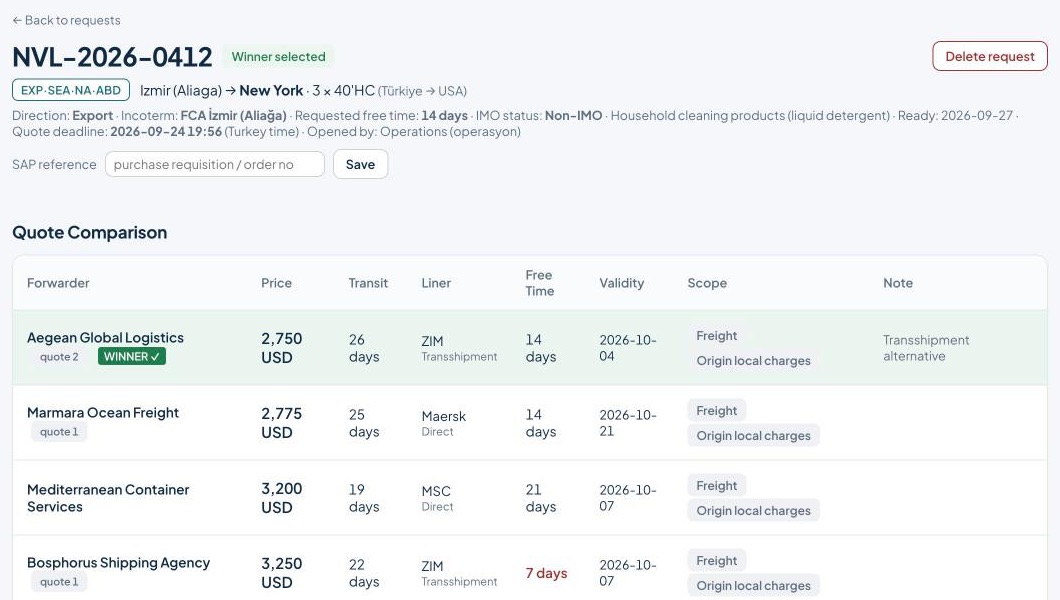
- Collect quotesCarriers fill in a form, the table fills itself
- ComparePrice, transit, free time and scope side by side
- Pick the winnerThe carrier is notified automatically
Designed for your spot procurement process
A quote process scattered across phone calls, emails and spreadsheets comes together in one place.
Your procurement team enters the request once; carriers quote on the same form, in the same units. The comparison is ready when the quotes arrive, and your past purchases stay in a searchable archive.
See at a glance who has quoted and who you are still waiting for.
Everyone enters prices in the same format; units and currencies never get mixed up.
When the deadline passes, the quotes are already in front of you.
Choose what you need
Spot quote management is included in your membership. For the journey after loading, shipment tracking can be added as an extra service.
Spot quote management
Sea, road and air requests; carrier invitations, deadlines and automatic reminders.
Carrier quote portal
Carriers quote through a single link with no account; up to three options each.
Comparison and reports
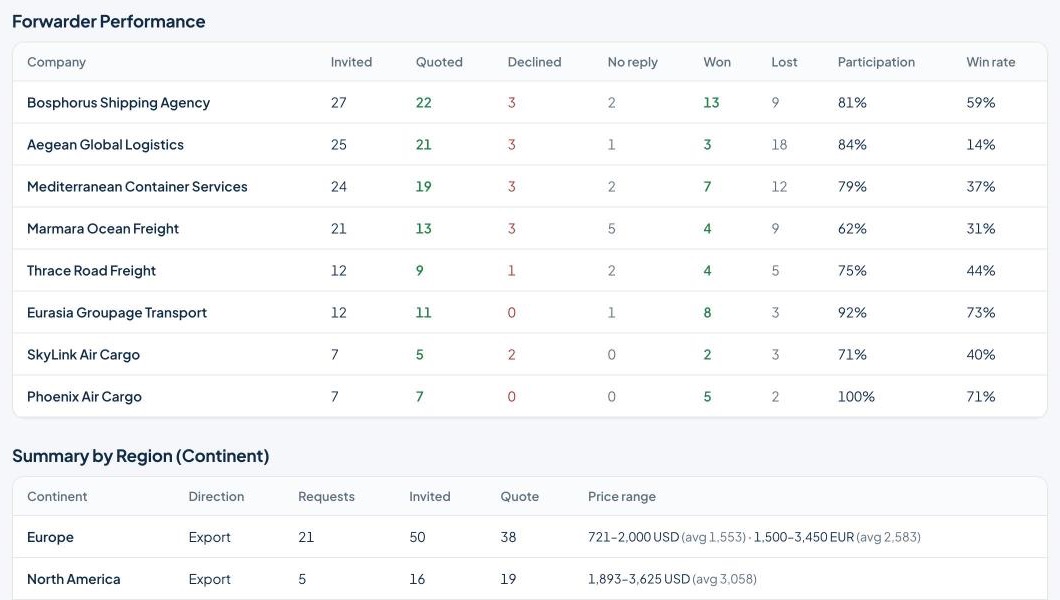
Decide in one table, keep a decision note, track forwarder performance and price reports.
Shipment tracking
Container and vessel events, live map, ETA revisions and automatic updates to your consignee.
Explore shipment tracking →Every step from request to decision on one platform
A quote process that is simple for procurement teams and effortless for carriers.
A spot request in minutes
Choose the transport mode, route and equipment; the request gets a reference number automatically.
- Container, truck, partial pallet and air cargo details
- Incoterm, ready date and requested free time
- Dangerous goods (IMO) status, MSDS and attachments
- Carrier matching by continent and country
Carriers quote with a single link
Each invited company receives its own password-free link. They enter their quote without creating an account or installing anything.
- Up to three options per invitation: transshipment, direct, different line
- A revised quote replaces the old one, no confusion
- Request documents are downloaded from the same screen
Compare in one table, document the decision
All quotes in one table, with the lowest price highlighted. When you pick the winner, the carrier is notified automatically.
- Price, transit, free time, validity and scope side by side
- Reports by carrier and route, export to Excel
- Past requests and decisions in one archive
Never miss a quote
Your procurement team gets an email when a quote arrives and when the quote deadline passes. The button in the email opens the request directly.
- "New quote received" and "quote deadline passed" notifications
- Invitations and notifications go out from a corporate address; no email setup needed
- Role-based users: admin, procurement, operations
Keep an eye on your cargo after it sails
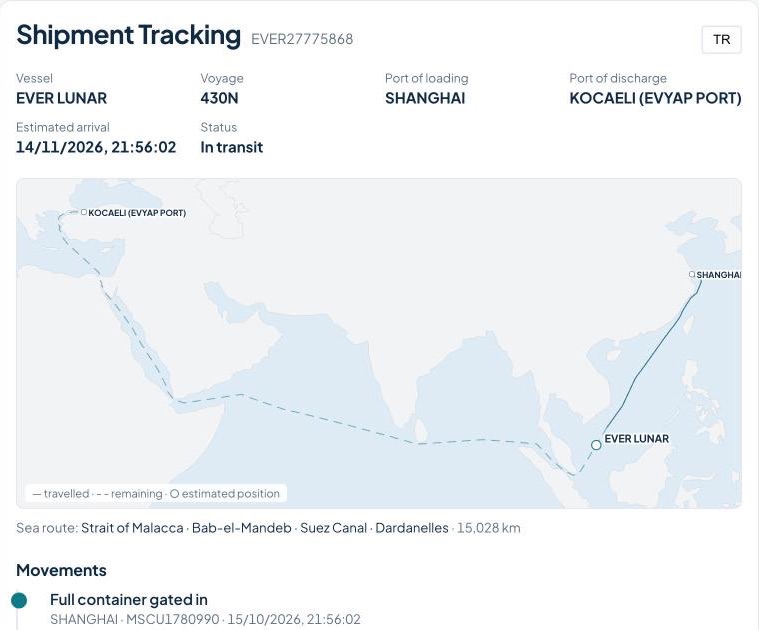
Track the sea shipments you awarded, container by container. Every event from the carrier lands on the map and the timeline; your consignee sees the same screen without logging in.
- Start tracking in one step with a B/L, booking or container number
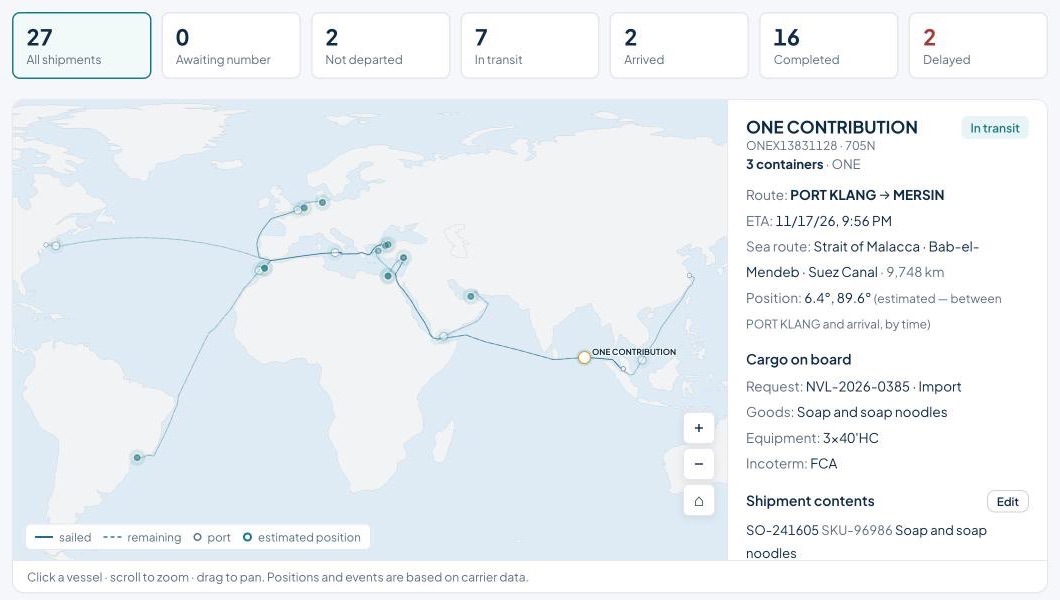
- Real sea routes on a world map: Suez, Hormuz, Malacca, Cape of Good Hope
- Estimated position at sea, based on departure and arrival times
- Search by order no., SKU or product; click a vessel to see what is on board
- Tracked until every container is returned empty
All your vessels on one map. For each shipment the real sea route between origin and destination, canals and straits passed, and remaining distance.
Loading, departure, transshipment, arrival, discharge and empty return: your consignee gets an email on every new event.
You are notified when the ETA changes; delayed shipments are listed separately on the home screen.
Transit times per lane, carriers' ETA deviation and monthly container volume.
Your consignee follows it without logging in
Each shipment gets its own tracking link. When your consignee opens it they see the vessel on the map, the sea route and every event, in English or Turkish. No more "where is my cargo?" calls.
- An add-on to your membership
- Up to 25 shipments tracked per month
- One B/L or booking = 1 shipment, however many containers
- Allowance renews monthly
Your data is yours, your workspace is dedicated to you
Dedicated workspace
Your requests and quotes are never mixed with other companies' data.
Strong sign-in
Protect your accounts with two-step verification and passkeys.
Daily backups
Data is backed up automatically every day; download it whenever you like.
Data protection and security
Our privacy notice is published. Our controls and ISO 27001 status are on the security page.
Frequently asked questions
Is shipment tracking included in the membership?
No. Shipment tracking is an extra service (Plus). Just email us and we enable it on your account in one click.
What does shipment tracking show?
Container and vessel events, vessel name and voyage, estimated position on the real sea route, ETA and its revisions. Tracking continues until every container is returned empty, and your consignee gets an email on each event.
What if one B/L covers many containers?
Tracking by B/L or booking counts as one shipment however many containers it holds; every container is tracked individually.
Do carriers have to sign up for a new system?
No. Every invited company receives its own personal link. No password or account is needed; they open the link and enter their quote.
Can a carrier submit more than one quote?
Yes. A carrier can offer up to three options for the same request, for example separate prices for transshipment and direct service. Each option appears as its own row in the comparison table.
What happens when the quote deadline passes?
The request stops accepting quotes and your procurement team receives an email summarising the quotes received. The button in the email takes you straight to the comparison screen.
Is there anything to install?
No. Navluno runs in the cloud and you use it in your browser. You can start as soon as your account is open.
Which transport modes are supported?
Sea (FCL and LCL), road (FTL and LTL) and air. It works for both import and export requests.
Where is our data stored?
In a workspace dedicated to your company. Requests, quotes and documents are never mixed with other customers' data and are never used for marketing. See our privacy policy for details.
Try it on your next shipment
Open your account in a few minutes, or let us give your team a short demo.